Upgrades 101: Hard Drives
Per Wikipedia –
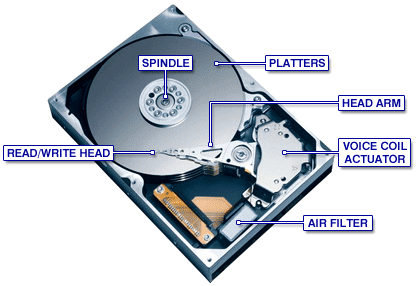
“A hard disk drive (HDD; also hard drive or hard disk)[2] is a non-volatile, random access digital magnetic data storage device. It features rotating rigid platters on a motor-driven spindle within a protective enclosure. Data is magnetically read from and written to the platter by read/write heads that float on a film of air above the platters. Introduced by IBM in 1956, hard disk drives have decreased in cost and physical size over the years while dramatically increasing in capacity.”
When it comes to PC/Mac hard drives (HDs), they mainly come in two connection types: the older standard IDE (Intergrated Drive Electronics) , and the current standard SATA (Serial Advanced Technology Attachment). You typically find older systems use the IDE type connector.