Online Shopping Tips for the Holidays!

  • Post author:

Tips: Shopping Tip List

Here’s a list of tips you should consult when shopping online. Print this page and keep it in a handy place so it will be easy to review before you order.

  1. Trust your instincts. If you don’t feel comfortable buying or bidding on an item over the web, or if you feel pressured to place your order immediately, maybe you shouldn’t.
  2. Be knowledgeable about web-based auctions. Take special care to familiarize yourself not only with the rules and policies of the auction site itself but with the legal terms (warranties, refund policy, etc.) of the seller’s items that you wish to bid on.
  3. Double check pricing. Be suspicious of prices that are too good to be true. Also consider carefully whether you may be paying too much for an item, particularly if you’re bidding through an auction site. You may want to comparison shop, online or offline, before you buy. Make sure there are not extra shipping or handling costs.  (more…)

Continue ReadingOnline Shopping Tips for the Holidays!

Carrier IQ: Should You Be Worried?

  • Post author:

What is Carrier IQ?

Carrier IQ is software that comes pre-installed on certain handheld devices. It collects usage data that mobile operators and device manufactures analyze so they can make hardware, network and service improvements, according to Carrier IQ. It runs all the time and cannot be turned off, although it can be removed by unlocking the phone and gaining administrator access, which typically voids the warranty.

A 25-year-old systems administrator in Connecticut set off a media firestorm after discovering mysterious software on his Android that appeared to be recording his activities. Software maker Carrier IQ says the software is designed to give carriers usage and other stats so they can improve the network and service. But the researcher argues that the software represents a serious privacy threat because sensitive data is being logged without user permission.

[via CNet] (more…)

Continue ReadingCarrier IQ: Should You Be Worried?

Making Google Chrome Work for You!

  • Post author:

We know a lot of our readers use Google Chrome as their daily browser.  Since it is also our favorite, we thought it would be relevant to post some ways to make Chrome work better for you!  We scoured the web and came up with these cool keyboard shortcuts!

Page Navigation Shortcuts

  • Space Bar – Page down one full screen at a time
  • Page Down — Page down one full screen at a time
  • Down Arrow – Scroll Down
  • Shift  + Space Bar – Page up one full screen at a time
  • Page Up — Page up one full screen at a time
  • Up Arrow – Scroll Up
  • Home – Go to the top of the webpage
  • End – Go to the bottom of the webpage

Browser Window Shortcuts

  • Ctrl + N – Open a new window
  • Ctrl + Shift + N – Open a new window in incognito mode (Pages viewed in incognito mode won’t show in browser history or search history. They also won’t leave cookies or other traces)
  • Alt + F4 – Close the current window
  • Shift + Click on link – Open the link in a new window (more…)

Continue ReadingMaking Google Chrome Work for You!

Stop! You Have Been Warned.

  • Post author:

Have you ever been blissfully surfing the web, when you click on an interesting link and all heck breaks loose?  Depending on what anti-virus/malware software you are using, alarms go off and instead of your link loading, a big read stop sign shows up with the ominous message that reads to effect of “All who enter here are lost!” or less dramatically… “This site is known to contain malware or viruses which could harm your computer. It is recommended that you do not proceed.”.  Seen that before?  How many times have you ignored it and proceeded anyway?  Be honest.  Later did you notice weird things happening, like unexpected pop-ups, or new toolbars, or your computer running funny?  Yep.  Its just like running a stop light.  Bad things can happen.

(more…)

Continue ReadingStop! You Have Been Warned.

Upgrades 101: Hard Drives

  • Post author:

Per Wikipedia –

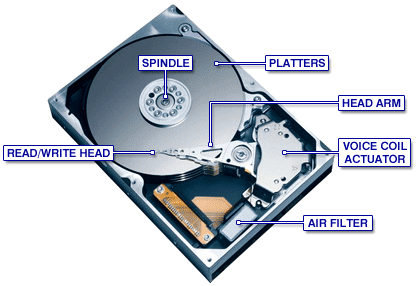
“A hard disk drive (HDD; also hard drive or hard disk)[2] is a non-volatilerandom access digital magnetic data storage device. It features rotating rigid platters on a motor-driven spindle within a protective enclosure. Data is magnetically read from and written to the platter by read/write heads that float on a film of air above the platters. Introduced by IBM in 1956, hard disk drives have decreased in cost and physical size over the years while dramatically increasing in capacity.”

When it comes to PC/Mac hard drives (HDs), they mainly come in two connection types: the older standard IDE (Intergrated Drive Electronics) , and the current standard SATA (Serial Advanced Technology Attachment). You typically find older systems use the IDE type connector.

(more…)

Continue ReadingUpgrades 101: Hard Drives

PC Hygiene: Keep It Clean!

  • Post author:

Another aspect of computer maintenance most people don’t consider is cleanliness.  Yes, your PC or Mac needs to periodically be cleaned.  Now I don’t mean with soap and water!  Usually a microfiber towel will suffice to remove dust, crumbs, and miscellaneous from the computers surface.  You can use “canned air” for cleaning your keyboard and getting into other nooks and crannies.  That’s the easy part.  Whats more difficult, and ultimately more important, is cleaning the inside of the computer.  That area is a perfect environment for accumulating dust.  Months and even years of dust build up can cause your system to overheat and operate erratically.  It can even cause damage to circuits!  Below is an example of a computer in need of a good cleaning: (more…)

Continue ReadingPC Hygiene: Keep It Clean!

All AC Adapters are NOT Created Equal…

  • Post author:

One of the most confusing aspects of mobile computing for most people is the AC adapter.  Why is this confusing you ask?  Don’t you just plug it in and go?  Well, its not actually quite that simple.

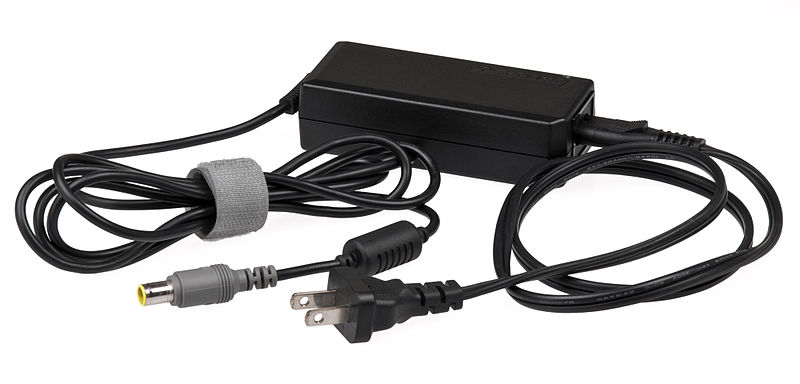
The AC adapter is what is what gives a charge to your battery, to power your laptop.  It can also bypass your battery and directly power your device.  Most adapters are comprised of two components.  The power adapter and the power cord.  The power cord is what plugs into the wall, then into the power adapter.  The power adapter then converts the incoming electricity into the correct voltage/amperage for your device. (more…)

Continue ReadingAll AC Adapters are NOT Created Equal…

Online Safety – Keeping Kids Safe

  • Post author:

With todays world becoming increasingly internet oriented, online safety is more of a concern than ever.  The internet is full of predators, from pedophiles, to scammers and identity thieves, to cyber bullies.

This dosent mean that your children should avoid the internet, it just means that you should be aware of the pitfalls and know how to protect them. (more…)

Continue ReadingOnline Safety – Keeping Kids Safe

Info You Should Know : Apple MacBook

  • Post author:

Have a MacBook purchased between Oct 2009 and April 2011?  Well if you have any issues with the bottom of the case, specifically where the rubber on the bottom of the case separates from the bottom cover, Apple will replace the bottom cover FREE of charge!  You will, of course, need to provide your serial number.  You can make arrangements with your local Apple Store Genius or your authorized Apple Repair Center. You can also have the part shipped directly to you, if you are comfortable doing the install yourself.  Alternatively you can order the part and have Geek Easy do the…

Continue ReadingInfo You Should Know : Apple MacBook

End of content

No more pages to load